GoraniRhino · SketchUp · Blender 한국어

The city around
your site
, modeled
in Rhino.

Gorani is a Rhino 8 plugin, with SketchUp and Blender versions on the way. Pick a site on the map and it builds the buildings, roads, terrain and water within the radius in your open document, along with an Illustrator basemap. It's free.

Extent
Example drawn from made-up data
Makes
3D context, basemap, analysis maps
Price
Free (donations welcome)
Runs on
Rhino 8; SketchUp, Blender soon
Worldwide
OpenStreetMap buildings and roads, terrain
Korea
Nationwide, with parcels and zoning
Install
Search Gorani in Package Manager
Not needed
  • An account
  • Payment
  • Grasshopper
  • Python setup
  • Download, then import

Installing

The Rhino 8 version is ready now. No Grasshopper, no Python.

  1. Open Package Manager

    Type this in the Rhino command line.

    PackageManager
  2. Install Gorani

    Search for Gorani, install it, and restart Rhino.

    Gorani
  3. Open the panel

    Type Gorani and the panel opens next to the viewport. For a site outside Korea, press DB 없이 해외 대상지로 계속 (continue without the Korean data).

  4. Pick a site and generate

    Drop a point (위치) or draw an area (구역), click through to the end and press 생성 시작 (Generate). The 3D model goes into your document and the drawings into a result folder.

Found a bug? GitHub Issues

SketchUp coming soon

An extension for SketchUp 2022 and later. Install steps go here once Extension Warehouse review is done.

Same panel and result folder as the Rhino version. The 3D model comes in as one group per site.

Blender coming soon

An extension for Blender 4.2 and later. Install steps go here once Blender Extensions review is done.

The panel opens in a browser tab and the 3D model comes in as collections.

The panel is only in Korean for now. Here are the words you'll need.

대상지
Site
범위
Extent
옵션
Options
결과
Results
위치
Point
구역
Area
필지
Parcel (Korea)
반경
Radius
다음
Next
뒤로
Back
생성 시작
Generate
폴더 열기
Open folder

What it looks like

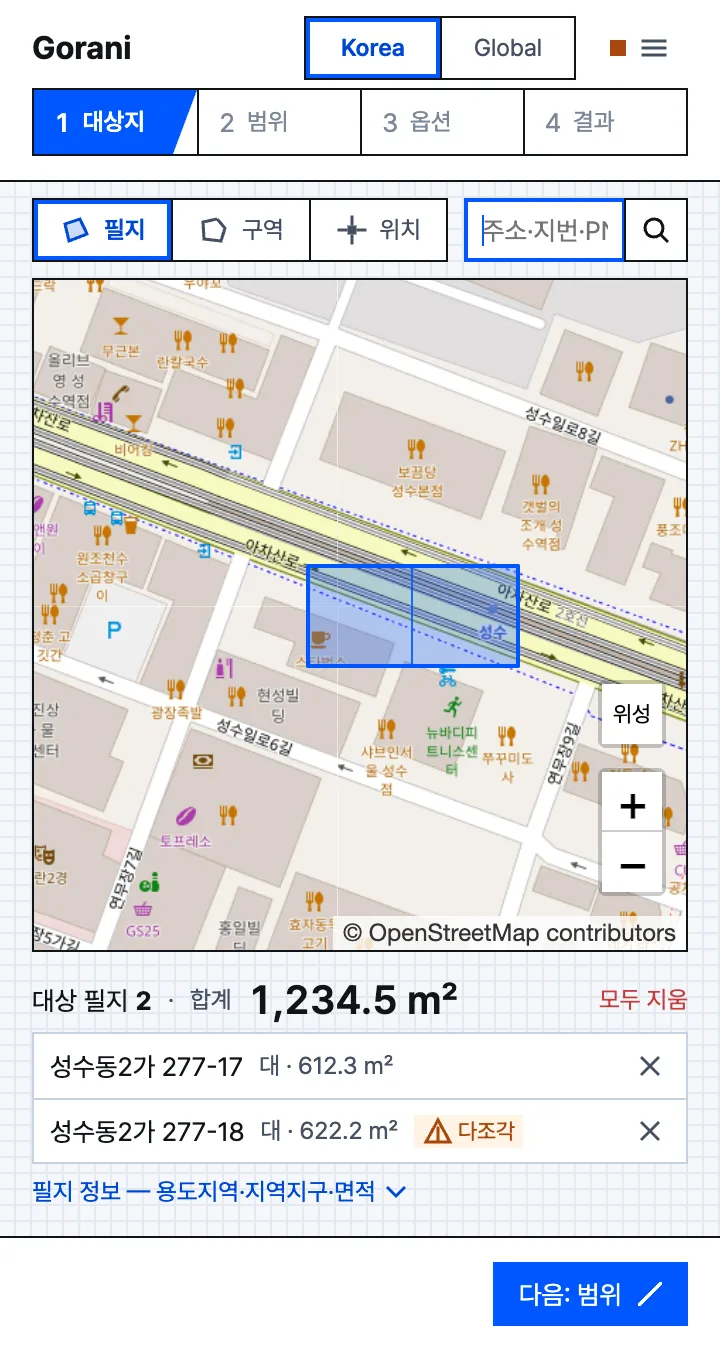
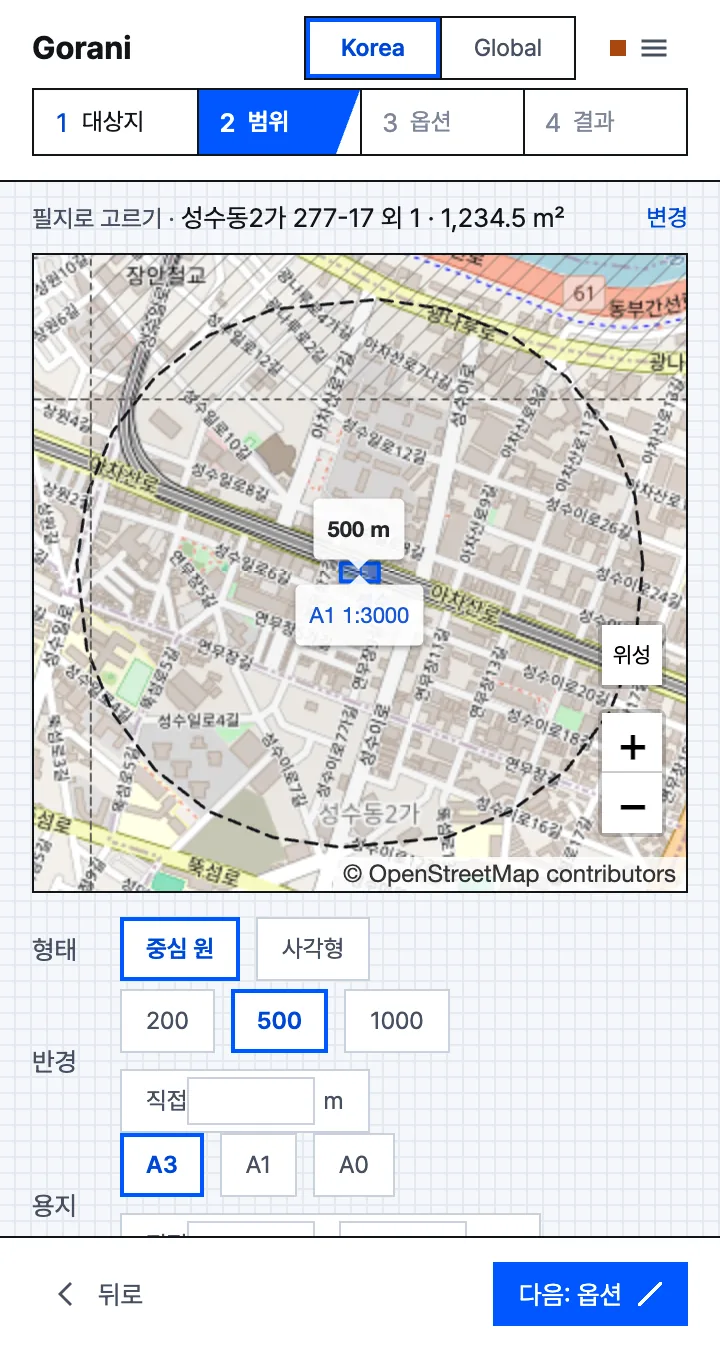
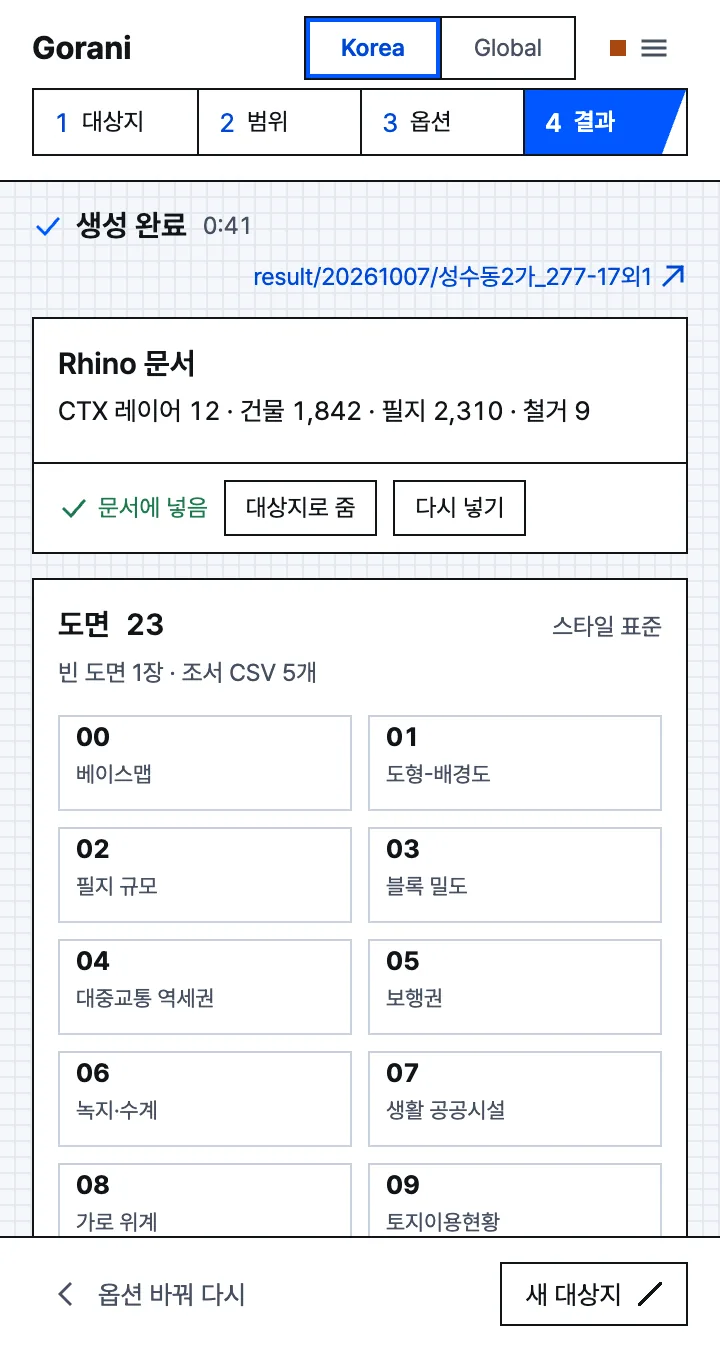
It docks next to Rhino as a panel and takes you through site, extent, options and results. You can leave the options at their defaults.

  • Site step of the panel: two parcels in Seongsu-dong, Seoul, selected in blue on the map, with their total area of 1,234.5 square meters below.
    SiteClick parcels, draw an area, or drop a point. You can search by address.
  • Extent step: a dashed 500 m circle around the site, with cells for shape, radius and paper size.
    ExtentSet the radius, paper size and scale. Everything inside the dashed circle gets modeled.
  • Results step: done in 41 seconds, 1,842 buildings placed in the Rhino document, and a grid of 23 drawings below.
    ResultsThe 3D model is already in your document. Open the drawings from the result folder in Illustrator.

Output

Each run creates one folder, named by date and site.

Result folder

result/20261014/<site>/
├─ context.3dm      3D model (also placed in your document)
├─ basemap_1000.ai  Illustrator basemap
├─ sheets/          analysis maps (SVG, AI)
├─ tables/          parcel and building tables (CSV)
└─ log.txt          data sources and dates

Basemaps come on A3 or A1 paper at 1:1,000 to 1:5,000, with the artboard set to the paper size.

Layers added to Rhino

  • Siteboundary
  • ParcelsKorea: ID, land category, zoning
  • Buildingsheight from floors or OSM tags
  • Terrainmesh
  • Roadssurfaces
  • Waterrivers, streams, ponds
  • Green · Railparks, tracks

Buildings and parcels carry attributes such as floors and use as User Text.

Analysis maps Korea only, since they need parcel and zoning data

  1. 00Base map베이스맵
  2. 01Figure-ground도형-배경도
  3. 02Parcel grain필지 규모
  4. 03Block density블록 밀도
  5. 04Transit catchment대중교통 역세권
  6. 05Walking distance보행권
  7. 06Green and blue녹지·수계
  8. 07Community facilities생활 공공시설
  9. 08Street hierarchy가로 위계
  10. 09Land use토지이용현황
  11. 10Land category지목 현황
  12. 11Zoning용도지역
  13. 12Districts용도지구·구역
  14. 13Planning facilities도시계획시설·지구단위계획
  15. 14Building use건축물 용도
  16. 15Building height건축물 층수
  17. 16Building age건축물 노후도
  18. 17Land price공시지가
  19. 18Elevation표고
  20. 19Slope경사
  21. 20Viewsframe to draw on
  22. 21Image of the cityframe to draw on
  23. 22Synthesisframe to draw on
  • Outside Korea you get the 3D model and the basemap. The parcel and zoning maps need Korean data.
  • Each drawing lists its data sources and reference dates.
  • You can change colors, line weights and text sizes and save them as a style file (JSON).

Using it from an AI agent

If you have Claude or ChatGPT connected to Rhino through Rhino MCP, ask it to install this plugin instead of drawing the surrounding buildings one by one. It's faster and more accurate. For example:

Install the Gorani plugin and open its panel

You still pick the site in the panel yourself. There's a plain-text description for AI tools at llms.txt.

Install commands for agents
# Windows
"C:\Program Files\Rhino 8\System\Yak.exe" install Gorani

# macOS
"/Applications/Rhino 8.app/Contents/Resources/bin/yak" install Gorani

# after restarting Rhino, in the command line
_Gorani

Rhino needs a restart before the plugin loads.

It's free

I don't think anyone should have to pay for a context model of their site. The data is all public, and everything runs on your own machine, so I'm giving it away.

If it saved you time, you can chip in. Donations go toward data updates and new features. Everyone gets the same features either way.

Support on GitHub Sponsors A one-person project.